ERP Software Sri Lanka (2026): Complete Guide for Small & Medium Businesses
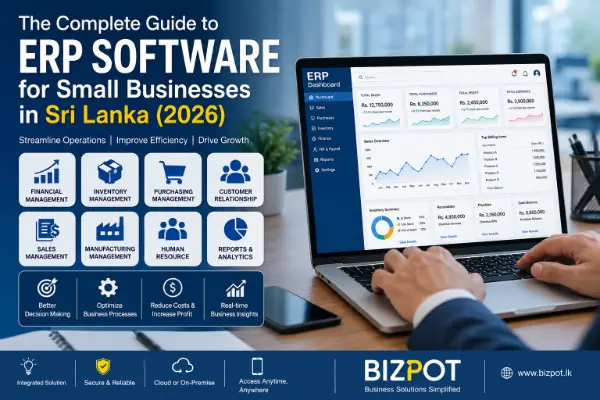
The Complete Guide to ERP Software for Small Businesses in Sri Lanka (2026)
Introduction
Running a business in today's competitive market requires more than hard work—it requires smart technology. Many Sri Lankan businesses still rely on spreadsheets, handwritten records, and disconnected software to manage their daily operations. While these methods may work for a small operation, they become inefficient as a business grows.
This is where Enterprise Resource Planning (ERP) software makes a significant difference.
An ERP system integrates your accounting, inventory, sales, purchasing, customer management, human resources, manufacturing, and reporting into a single platform. Instead of using multiple software applications, businesses can manage everything from one centralized system.
Whether you own a retail shop, manufacturing company, wholesale business, distribution company, or service organization, implementing an ERP system can improve efficiency, reduce operational costs, and support long-term growth.
What is ERP Software?
ERP (Enterprise Resource Planning) software is an integrated business management system that connects all departments within an organization.
Rather than maintaining separate systems for finance, inventory, sales, and purchasing, an ERP platform stores all business information in one centralized database.
For example:
- A sales order automatically updates inventory.
- Inventory changes trigger purchase planning.
- Purchases update accounting.
- Management receives real-time reports instantly.
Every department works with the same data, eliminating duplication and reducing errors.
Why Do Sri Lankan Businesses Need ERP?
Many businesses begin with simple accounting software or Microsoft Excel. While these tools are suitable for startups, they become difficult to manage as business operations expand.
Common challenges include:
- Duplicate data entry
- Inventory inaccuracies
- Missing purchase records
- Slow reporting
- Manual invoicing
- Poor customer tracking
- Limited visibility into business performance
An ERP system addresses these issues by integrating all business processes into one unified platform.
Signs Your Business Needs an ERP System
Your business may benefit from ERP if you experience:
- Inventory shortages despite available stock
- Multiple software applications that don't communicate
- Manual invoice preparation
- Difficulty generating financial reports
- Frequent stock discrepancies
- Slow customer service
- Time-consuming month-end accounting
- Lack of management visibility
- Growth beyond current systems
- Increasing operational complexity
If several of these challenges sound familiar, it may be time to consider ERP.
Key Benefits of ERP Software
1. Centralized Business Information
ERP creates a single source of truth for your organization.
Everyone accesses the same information, reducing inconsistencies and improving collaboration.
2. Better Inventory Management
Inventory management becomes more accurate through:
- Real-time stock levels
- Barcode integration
- Batch tracking
- Expiry management
- Automatic stock alerts
- Multi-warehouse management
This minimizes stock losses and improves inventory turnover.
3. Faster Financial Management
Finance teams benefit from:
- Automated journal entries
- Bank reconciliation
- VAT calculations
- Financial statements
- Cash flow monitoring
- Budget tracking
Management gains instant visibility into financial performance.
4. Improved Sales Process
Sales representatives can:
- Create quotations
- Convert quotations into sales orders
- Generate invoices
- Track customer balances
- View customer purchase history
- Monitor sales performance
This enhances customer service and shortens sales cycles.
5. Purchasing Optimization
ERP helps businesses purchase more efficiently by:
- Monitoring supplier performance
- Tracking purchase orders
- Managing approvals
- Comparing supplier prices
- Forecasting future demand
Purchasing decisions become data-driven instead of reactive.
6. Real-Time Reporting
Management dashboards provide instant insights into:
- Daily sales
- Gross profit
- Inventory valuation
- Outstanding receivables
- Supplier balances
- Cash flow
- Business performance
No more waiting until the end of the month to understand how the business is performing.
Essential ERP Modules
A modern ERP solution typically includes:
Accounting & Finance
- General Ledger
- Accounts Receivable
- Accounts Payable
- Fixed Assets
- Bank Reconciliation
- Financial Statements
Inventory Management
- Stock Control
- Barcode Management
- Warehouse Transfers
- Batch Tracking
- Serial Number Tracking
Sales Management
- Quotations
- Sales Orders
- Invoicing
- Customer Pricing
- Delivery Tracking
Purchasing
- Purchase Requests
- Purchase Orders
- Goods Receiving
- Supplier Management
Customer Relationship Management (CRM)
- Customer Database
- Lead Tracking
- Opportunity Management
- Sales Pipeline
Manufacturing
- Bill of Materials (BOM)
- Production Planning
- Work Orders
- Material Consumption
- Finished Goods Tracking
Human Resources
- Employee Records
- Attendance
- Payroll
- Leave Management
- Performance Reviews
Cloud ERP vs On-Premise ERP
Cloud ERP
Advantages:
- Lower upfront investment
- Accessible from anywhere
- Automatic updates
- Minimal IT maintenance
- Easy scalability
Best suited for businesses with remote teams or multiple branches.
On-Premise ERP
Advantages:
- Greater control over infrastructure
- Full ownership of data
- Customizable environment
- Suitable for organizations with strict compliance requirements
Best suited for businesses with dedicated IT resources and specific infrastructure needs.
Industries That Benefit Most from ERP
ERP solutions are valuable across many industries, including:
- Manufacturing
- Retail
- Wholesale Distribution
- Construction
- Logistics
- Healthcare
- Hospitality
- Educational Institutions
- Automotive
- Food & Beverage
- Apparel
- Pharmaceuticals
Common ERP Implementation Mistakes
Avoid these common pitfalls:
- Selecting software based solely on price.
- Failing to define business requirements.
- Ignoring employee training.
- Migrating inaccurate data.
- Skipping testing before going live.
- Underestimating implementation time.
- Not securing management support.
Careful planning and user involvement are essential for a successful implementation.
How to Choose the Right ERP System
When evaluating ERP solutions, consider:
- Ease of use
- Scalability
- Industry-specific features
- Integration capabilities
- Mobile access
- Reporting tools
- Vendor support
- Security
- Implementation experience
- Total cost of ownership
Request demonstrations and involve key stakeholders before making a decision.
ERP Implementation Process
A structured implementation typically includes:
- Business Process Analysis
- Requirement Gathering
- System Configuration
- Data Migration
- User Training
- System Testing
- Go-Live
- Post-Implementation Support
Working with an experienced implementation partner reduces risks and accelerates adoption.
Frequently Asked Questions
Is ERP suitable for small businesses?
Yes. Modern ERP solutions are scalable and designed to meet the needs of small, medium, and large businesses.
How long does ERP implementation take?
Implementation time varies depending on the size and complexity of the business. Smaller projects may take a few weeks, while larger implementations can take several months.
Can ERP integrate with existing software?
Many ERP systems support integrations with accounting platforms, e-commerce websites, payment gateways, and third-party applications.
Is cloud ERP secure?
Reputable cloud ERP providers use encryption, regular backups, and robust security measures to protect business data.
Can ERP help improve customer service?
Yes. By providing real-time access to customer information, order status, and inventory availability, ERP enables faster and more accurate customer responses.
Why Choose BizPot?
At BizPot, we understand the operational challenges faced by Sri Lankan businesses. Our ERP solutions are designed to simplify business processes, improve visibility, and support sustainable growth.
Our services include:
- Business process consultation
- ERP implementation
- Data migration
- User training
- System customization
- Ongoing technical support
- Reporting and analytics
- Integration services
Whether you are a growing SME or an established enterprise, BizPot can help you implement the right solution for your business.
Conclusion
ERP software is more than just a technology investment—it is a strategic decision that enables businesses to operate more efficiently, make informed decisions, and scale with confidence.
By integrating finance, inventory, sales, purchasing, and operations into one platform, ERP eliminates manual processes, reduces errors, and provides real-time insights that support better decision-making.
As Sri Lankan businesses continue to embrace digital transformation, adopting the right ERP solution can provide a lasting competitive advantage.
If your organization is ready to improve productivity, reduce operational costs, and prepare for future growth, now is the ideal time to explore an ERP solution tailored to your business needs.